GIF to Sprite Sheet
One PNG, every frame
Turn an animated GIF into a transparent PNG grid. Download the sheet on its own or with frame coordinates and timing.
Free, local processing
Start with your GIF
Put every GIF frame in one PNG
Choose a file or drop it here.
GIF · Up to 20 MB and 500 frames
See the grid
Your GIF stays on your device.
What is a GIF sprite sheet?
A GIF sprite sheet is one still image that arranges the frames of an animation in a grid. VisualFormat reconstructs each frame at its original size, lays the frames out left to right and top to bottom, and can include a JSON file with each frame’s rectangle and timing.
- Input
- Animated or single-frame GIF
- Output
- Transparent PNG or a ZIP with PNG + JSON
- Controls
- Adjustable columns and 0–32 px spacing
- Processing
- Free, on your device
Limits: up to 20 MB, 500 frames, 4,096 pixels per input side and 40 million total full-frame pixels. The output sheet can be up to 4,096 pixels per side and 12 million pixels in total.
Pack a robot walk cycle into a game sprite sheet
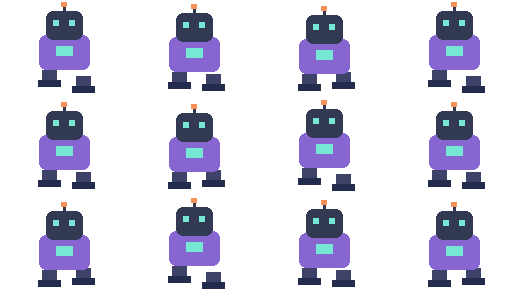
Example: Set the 128 × 96 robot animation to 4 columns with 2 px spacing. The twelve frames fill a 4 × 3 grid. In the exported JSON, the second frame starts at x = 130, y = 0, so an importer can find it without guessing the gaps.


How to convert a GIF to a sprite sheet
- 01
Choose your GIF
Open a GIF from your device or try the example. The tool reads the frame count and dimensions.
- 02
Set the grid
Use the suggested columns or set your own. Choose spacing and check the output dimensions before generating.
- 03
Preview and save
Inspect the PNG grid and replay the animation from its cells. Download the PNG or the ZIP with frame coordinates and timing.
Choose columns for the dimensions your project can import
Start with the texture limit of the renderer or editor that will use the PNG. A tall strip can exceed a height limit even if the same frames would fit in a more square grid. In the example, one column would need 7,680 pixels of height. Four columns fit all 24 frames into a 1,920-pixel square before any spacing is added.
Use the smallest gap your workflow needs. Empty space between cells can help separate sprites in an editor, but it increases both the sheet dimensions and the amount of image data.
Keep frame order and variable timing when you import
Download the PNG with JSON if the animation has holds or uneven timing. Keep the files together and read the coordinates in the exported order. The rectangles locate pixels in the sheet, while timestamps and delays describe playback. If your importer uses a single frame rate, review long holds and short movements before shipping the animation.
GIF to Sprite Sheet FAQs
Can I make a transparent sprite sheet from a GIF?
Yes. The PNG keeps transparency from the GIF’s rendered frames. Gaps and unused cells are also transparent.
What is in the PNG + JSON ZIP?
The ZIP contains sprite-sheet.png and frames.json. The JSON includes zero-based frame indices, pixel rectangles, timestamps and delays in milliseconds, and the source GIF loop setting.
How do I play a sprite sheet as an animation?
Draw each rectangle listed in frames.json, starting with index 0. Use its x, y, width and height to crop the PNG, and use delayMs to decide how long to show it. The built-in preview reads the exported PNG and frame data.
Are sprite sheet frames resized or cropped?
Each cell keeps the original GIF canvas size. For optimized GIFs, the tool restores the full visible frame before placing it in the grid.
What if my sprite sheet is too large?
Try a different column count or reduce the spacing. The output is limited to 4,096 pixels per side and 12 million pixels total. For larger animations, resize the GIF first.